

Tower Rush Demo
 FUN Demo
Pros
- Browser access works on the tested Android and iPhone devices.
- The main stake, Build and Cashout controls remain accessible in the tested mobile layouts.
- Declining notification permission did not block the game in the tested 1win launcher.
- The same operator account showed its balance and settled history on a second device.
Cons
- A cached opening screen cannot accept new bets without a connection.
- The tested launcher and its data occupied more storage after a session than immediately after installation.
- The Android landscape layout collapses the Players panel.
- An interrupted connection can delay the displayed result after the server has accepted a bet.
Tower Rush app download: choose the access format first
A Tower Rush app download can refer to the operator's launcher, while the game itself runs as HTML5 inside a browser or embedded web view. For someone in Bangladesh choosing a phone route, distinguish the program you open, the game loaded within it and the operator managing your balance.
Galaxsys is the developer of the original title. The operator supplies the 1win launcher. A browser shortcut changes how you reach the web page. The shortcut leaves the product's identity intact, just as the operator's release number continues to identify its launcher.
I tested Tower Rush on Android and iOS using a Xiaomi 15 Ultra with HyperOS 2.0.219.0 and an iPhone 15 Pro with iOS build 22G91, keeping the browser and installed-launcher routes separate.
| Route | Device and software | What opens | Practical distinction |
|---|---|---|---|
| Android browser | Xiaomi 15 Ultra; Android 15; Chrome 141.0.7390.94 | HTML5 game | No operator APK installation in this route |
| Android launcher | Xiaomi 15 Ultra; 1win 4.7.3, build 40703 | HTML5 game inside WebView | The installed package belongs to 1win |
| iPhone browser | iPhone 15 Pro; iOS 18.6.3; Safari | HTML5 game | Browser navigation and the game remain separate layers |
| Embedded iPhone view | Telegram iOS 11.13.2, build 30842 | Web content inside WKWebView | Telegram is the container; WebKit comes from iOS 18.6.3 |
For a Tower Rush game download, start with the intended mode: the official demonstration uses FUN, while a money session uses an operator account. A Tower Rush online game download search does not change that division. The game overview explains the original title; the access instructions below concern getting it onto the screen.
Android browser access and the operator APK
Tower Rush APK and browser access on Android involve different installation steps: the browser loads the HTML5 game directly, while my 1win route first installed the operator's launcher.
Open the game in Chrome
Chrome opens the official demonstration without an operator installation. I entered the FUN game with no registration or deposit. The new session gave me 100,000 FUN. That demonstration counter remains separate from a BDT balance on an operator account.
- Open the official demo guide in your phone browser.
- Select the mobile demo route and wait until the stake field and Build control are active.
- Check that the balance is marked FUN before treating it as a practice session.
- Open Rules if you need the meaning of a control, then return to the game before entering a stake.
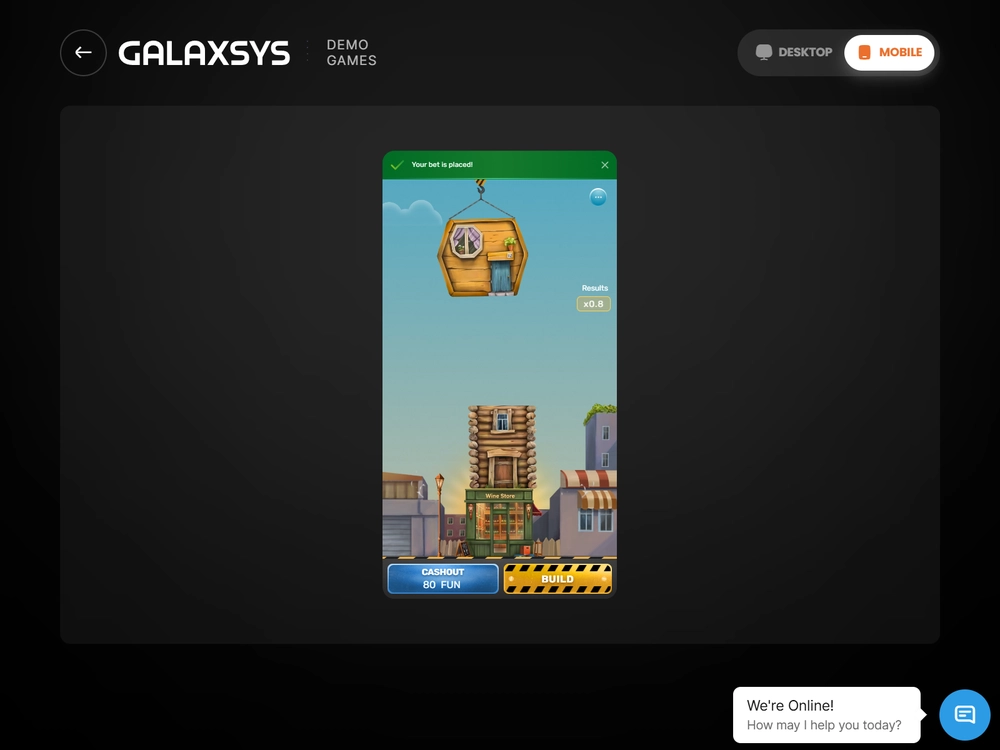
The mobile interface includes the stake field, ALL IN, x2, BUILD and CASHOUT, together with Players, History and Top panels.
Knowing which mode is open matters more than the icon used to reach it: a Tower Rush download search can lead to several kinds of access page, while the FUN or currency indicator describes the session on your screen.
Tower Rush game download for Android through 1win
For the tested Tower Rush game download for Android route, I selected Android in 1win's application section, installed the operator's launcher and used its catalogue to open the original Galaxsys game inside it.
If you are following a Tower Rush app download for Android instruction, identify the operator before installing its package. A Tower Rush casino app is the casino's access software, and a Tower Rush casino APK should be assessed as that operator's package. Neither description transfers ownership of the launcher to Galaxsys.
- Open the application section of the operator you already intend to use and select Android.
- Check the operator's identity, package details and stated device requirements before proceeding.
- Install its launcher, open it and sign in to the relevant operator account.
- Open the catalogue, search for Tower Rush and select the original Galaxsys card.
- Check the mode and currency before using the game controls.
The installation source, package version and game selected after login identify three different parts of this route.
In a separate catalogue check, I took 11.8 seconds to find and select the original game. The complete access sequence had four actions: catalogue, search, original card and money-mode launch. Keep that search interval separate from the cold-load results, which measure the subsequent wait for an interactive game.
Tower Rush APK download and installed storage
The 1win file I installed contained 32,505,856 bytes and required Android 10, API 29, with arm64-v8a architecture. My actual device ran Android 15, API 35. These are the requirements and environment of that launcher build; they are not a universal minimum specification for every browser route.
| Item | Measured or specified value | What the value describes |
|---|---|---|
| Downloaded file | 32,505,856 bytes | The operator's installer |
| Decimal file size | 32.505856 MB | Bytes divided by 1,000,000 |
| Binary file size | 31 MiB | Bytes divided by 1,048,576 |
| Space immediately after installation | 86.4 MB | Installed launcher |
| Space after a 20-minute session | 104.7 MB | Launcher plus its accumulated data |
| Storage increase | 18.3 MB | Difference between those two installed states |
| Installation duration | 19.4 seconds | Installing the package |
| First launcher opening | 3.8 seconds | Opening the operator shell |
| Game readiness after selection | 4.8 seconds | Waiting for the game to accept input |
File size and installed storage answer different questions. A Tower Rush APK download description may quote the installer alone. The phone then stores the expanded application and accumulated data. The 18.3 MB increase above belongs to one 20-minute session, rather than a fixed allowance for every future session.
For the route measured here, 1win is the package owner behind wording such as “Tower Rush download APK”, “Tower Rush APK app download” or “Tower Rush app APK download”, with the HTML5 game keeping its own configuration inside that launcher.
Similarly, “Tower Rush APK download latest version” and “Tower Rush APK latest version” should lead you to inspect the operator's release details. Version 4.7.3 and build 40703 identify the tested installation precisely; they do not declare that every other package or game session has the same release identifier.
The launcher specifies targetSDK 35 and compileSDK 35, separately from minSDK 29. Its touchscreen feature is required. Camera and NFC hardware features are optional. The minimum Android API, build target and runtime permission request therefore describe different parts of compatibility.
Tower Rush operator reviews
Six completed Bangladesh BDT tests. Scores and payment results reflect the tested accounts.
-

BDT access score7.15/10
- 96.55% configured RTP.
- 891 BDT received via bKash after a 9 BDT deduction.
-

BDT access score7.40/10
- 96.69% configured RTP.
- 1,900 BDT received via Nagad with no deduction after identity and address checks.
-

BDT access score7.15/10
- 96.19% configured RTP.
- 2,084.25 BDT received via Nagad after a 15.75 BDT withdrawal fee.
-

BDT access score7.15/10
- 97.00% configured RTP.
- 1,200 BDT received via bKash in 6 min 27 sec. The deposit had a 30.36 BDT external charge.
-

BDT access score7.40/10
- 96.65% configured RTP.
- 1,500 BDT received via bKash in full. The deposit had no external charge.
-

BDT access score7.40/10
- 96.33% configured RTP.
- 500 BDT received via bKash in full after identity and address checks.
I applied the launcher update to the installed copy. On signing into the same account, I still had BDT as its currency. The game also loaded the previous history. For a Tower Rush app APK update, check both the operator installation and the account history afterwards.
Tower Rush casino app permissions and login
Notification and camera requests appeared in response to specific actions. I enabled push to trigger the notification request. I chose document photography for KYC to trigger the camera request. Neither my contacts nor precise location was requested in this episode.
| Permission | What triggered the request | What happened after I declined |
|---|---|---|
| Notifications | Enabling push notifications | Push stayed off; the game and cashier remained accessible |
| Camera | Choosing document photography for KYC | Camera capture was unavailable; I selected a prepared document through the system file picker |
Push notifications remained off until consent. I activated biometric access for the saved login; for initial authorisation, I entered a password and confirmed the account. Biometrics provided a convenient return to an established account, with the initial checks remaining a separate step.
Installing access software, signing in and authorising a camera have separate purposes to check in a Tower Rush app download APK instruction, a Tower Rush casino APK download guide or a Tower Rush casino app download walkthrough.
iPhone access through Safari and embedded views
Safari loaded the HTML5 game on my iPhone 15 Pro in iOS 18.6.3, with a tested portrait viewport of 393 × 852 CSS pixels describing the page layout rather than the display's physical resolution.
Tower Rush App Store searches and the Safari route
A Tower Rush App Store search starts with a software listing, whereas Safari opens the game through its web route. Check which product and publisher a listing actually names before associating it with the original game. For direct browser access, open the mobile demo route and check the FUN label after loading.
For “Tower Rush download iOS”, the practical sequence is short:
- Open Safari and go to the mobile route in the demo guide.
- Wait for the stake field, Build and the balance indicator to become usable.
- Check the currency or FUN label and open Rules when you need the control definitions.
- Keep the session identifiable if you switch away from Safari, then check its state when you return.
A Tower Rush game app download label does not identify the game mode by itself. Tower Rush app free download wording also needs context. The browser demonstration starts with virtual FUN, while a money session has an operator balance and conditions. Free access to a demonstration does not turn its counter into money.
Tower Rush game app access inside Telegram
Telegram's embedded view is a different access container from Safari. In the separate iPhone route, Telegram was version 11.13.2, build 30842, and its WKWebView used the system WebKit supplied by iOS 18.6.3. There was no separate installed WKWebView version to compare with that system version.
When a Tower Rush game app opens inside a messaging application, check the container, operator account and active mode before treating a later browser window as a continuation of that session.
Loading time, data use and battery on the tested phones
The Android cold-load series averaged 4.90 seconds to interactive readiness, compared with 2.20 seconds for repeat loads with the cache retained. I measured the interval from selecting the original game until the stake field, Build and the FUN indicator were all active; the opening animation alone did not end the timing.
Cold and warm loads on Wi-Fi
I ran five cold attempts plus five warm attempts with the same Android environment, demo configuration and viewport. Each cold attempt began with cleared game data, whereas cached data remained available for the warm group. All ten attempts loaded successfully. The separate connection interruption described below was outside these two series.
| Cache condition | Five attempts, seconds | Mean, seconds | Median, seconds | Successful attempts |
|---|---|---|---|---|
| Cold | 4.8; 5.2; 4.6; 5.0; 4.9 | 4.90 | 4.90 | 5/5 |
| Warm | 2.1; 2.4; 2.2; 2.0; 2.3 | 2.20 | 2.20 | 5/5 |
The Wi-Fi connection measured 74.6 Mbit/s down, 26.3 Mbit/s up and 34 ms round-trip latency. My separate Grameenphone 4G LTE environment measured 21.8 Mbit/s down, 8.4 Mbit/s up and 61 ms latency; those figures describe that connection, not a nationwide Bangladesh service standard or a second set of game-load timings.
Installation, shell opening and game readiness are separate waits. A Tower Rush download Android instruction that merges them into one “launch time” loses that distinction. The cold-load interval begins after game selection; installing the package took 19.4 seconds in its own measurement.
Traffic, charge and the cost of a longer session
The cold launch consumed 8.6 MB, and the following 20-minute session used another 6.8 MB, giving 15.4 MB in total. A warm launch used 1.3 MB in its separate measurement. Adding cold, warm and session traffic together would count alternative launch conditions as though they happened once in a single opening.
| Measurement | Conditions | Result |
|---|---|---|
| Cold game launch | Game data loaded afresh | 8.6 MB |
| Warm game launch | Retained game cache | 1.3 MB |
| Session traffic | 20 minutes beyond loading | 6.8 MB |
| Cold launch plus session | 8.6 MB + 6.8 MB | 15.4 MB |
| Xiaomi battery | 20 minutes on Wi-Fi; 50% brightness | 82% to 78%, a 4-percentage-point drop |
| iPhone battery | 20 minutes on Wi-Fi; 50% brightness | 76% to 73%, a 3-percentage-point drop |
I also recorded a warm phone casing after 20 minutes of use.
The charge readings describe the tested devices, brightness and session length; they do not establish a battery-life ranking for Android versus iOS. Storage growth, network transfer and charge consumption use different units, so one small download figure cannot represent all three costs.
Controls, interrupted connections and changing devices
The main controls stayed accessible in the tested Android portrait and landscape layouts. My portrait check used a 393 × 873 CSS-pixel viewport with the amount, Build and Cashout visible. Rotating to 873 × 393 collapsed Players while preserving those controls; the iPhone portrait check was a separate observation.
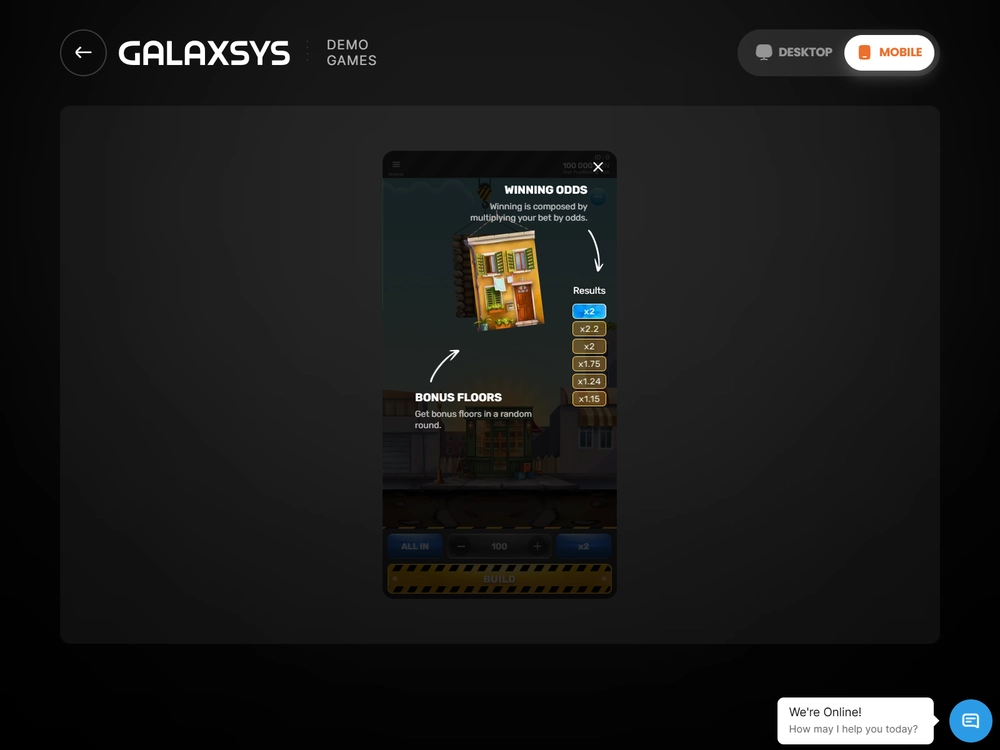
In airplane mode, the launcher opened from cache, but it accepted no new bets. Restoring connectivity brought back the server state.
In a separate FUN test, the server accepted the stake before an 18-second interruption. After reconnecting, I matched the round identifier and cashed out. The virtual balance showed only one stake debit.
A 25-second background pause also preserved the round identifier. On returning, I let the server finish restoring state, then reconciled the stake debit with the result. Redrawing the screen created no additional wager. In a separate action measurement, acceptance took 142 ms and the floor animation lasted 1.8 seconds, keeping server acceptance distinct from animation time.
If the view stalls, reconnect, then inspect the round identity, recorded stake and balance before sending another action. The rules allow an accepted unfinished round to close after one hour of inactivity if connectivity is not restored. For recovery cases beyond mobile display behaviour, open launch and session troubleshooting.
I also opened the same 1win account on the iPhone after the last round of my Android money session. It showed 3,249.00 BDT and the settled 418.00 BDT payout in history. Reading that record again did not credit it twice. Ordinary Logout ended the current session; the separate all-sessions action also ended access on the second device.
Tower Rush official app labels and package identity
An official identity check separates Galaxsys, the original game and the operator distributing its own software. A Tower Rush official app label or Tower Rush official app download instruction needs that distinction: the game name alone does not identify the publisher of an installation package.
Tower Rush original app searches and the game identity
A Tower Rush original app search requires a check of the exact product name: Tower Rush 2 and Tower Rush Branded are distinct titles. Read the full name and Galaxsys identity after launch, since a shared tower theme can span different products. Use the dedicated guide to identify the original game.
Descriptions such as Tower Rush app casino, Tower Rush casino download and Tower Rush casino game download combine the game name with an operator access task. The operator remains responsible for its account and cashier. The 1win access page covers that specific relationship and its account conditions.
Tower Rush earn money APK claims
"Tower Rush app earn money APK" and "Tower Rush earn money APK download" do not describe a wage or guaranteed return. A money-mode wager can lose its stake, regardless of the installation route. The words in a download listing do not change the rules governing the game or create a reliable income stream.
Treat “Tower Rush earn money APK”, “Tower Rush cash app” and “Tower Rush betting game download” as prompts to identify the actual product and account purpose. FUN practice, a game cashout and an external operator withdrawal are different things. For predictor or modified-package claims, use the scam and predictor guide.
Choose the route that matches your purpose
Use the browser route to inspect the original game and its FUN controls without installing the tested operator package. If you already use an operator launcher, keep its publisher, version and account separate from the game it loads. Both approaches depend on a connection for new bets, and a loaded screen does not replace checking the session state.
Open the official mobile demo to examine the phone layout from Bangladesh. Check the FUN label, locate the controls and keep any later BDT account activity within its operator-specific context.
Frequently asked questions
Does a Tower Rush download require an APK on Android?
The browser route uses HTML5 in Chrome. The separate tested APK route installs the 1win launcher, which opens the game inside a WebView. Choose the route first, then identify the software and account involved.
What does the 1win version number describe?
Version 4.7.3, build 40703, identifies the tested Android launcher. Keep that software-release label separate from the HTML5 game's configuration and from packages distributed by other operators.
Can I use Tower Rush on an iPhone through Safari?
Yes. I used Safari on an iPhone 15 Pro running iOS 18.6.3. The separate Telegram route used an embedded WKWebView, so it should be identified separately from the Safari session.
Do I need to allow notifications or camera access?
I could still open the game and use the cashier after rejecting notifications in the 1win test. With camera access declined, I uploaded a prepared document through the system file picker instead of photographing it.
Does an offline opening mean the game can accept bets?
No. In airplane mode the launcher opened from cache, but new bets were not accepted. Restoring the connection returned the server state. An already accepted round needs its state checked after a connection interruption.
How much network traffic did one session use?
The measured cold launch used 8.6 MB and the next 20 minutes used 6.8 MB, totalling 15.4 MB. A separate warm launch used 1.3 MB. These are the measured conditions, not a fixed data allowance for every device or session.