


Tower Rush Demo
 FUN Demo
Pros
- Email and phone registration routes are represented across the six operator tests.
- I created the 1win account without entering a promo code or enabling marketing messages.
- The official FUN demo can be opened without an operator account or deposit.
Cons
- Confirmation requirements differ between operators; entering a phone number does not always mean confirming it at sign-up.
- Successful email confirmation does not complete the document checks that can arise at withdrawal.
- A game listing does not establish registration eligibility: Betify excludes Bangladesh from account creation.
Which account do you need for the game?
Real-money access to the original Tower Rush by Galaxsys uses an operator account, with its own credentials, contact details and cash balance.
The Tower Rush register process starts with identifying the operator whose account you intend to use. Galaxsys supplies the game. The operator supplies the account environment in which you open it. Registering at one operator does not give you credentials for another that carries the same title.
The official FUN demo has a different access model: I opened it without an operator account or deposit, and its virtual funds stayed separate from the cash account used for real-money play.
If you already have an account at the relevant operator, use the existing credentials. Opening the game is then a navigation task within that account. Go to account access and recovery if you cannot sign in; a second registration is not the next step for a forgotten password.
The contact form on Tower Rush Bangladesh sends enquiries to the editor; it cannot create an operator account, receive a gambling deposit or complete a registration for you.
Tower Rush sign up methods in Bangladesh tests
Tower Rush sign up used three contact patterns across my six Bangladesh account tests: email, phone, or email plus phone. The table connects each method with its confirmation channel and the document request, if any, at my first withdrawal.
| Operator | Registration contact method | Sign-up confirmation | Documents requested at my first withdrawal |
|---|---|---|---|
| 1win | Email and phone | Email link | Identity document and proof of address |
| Stake | No new documents requested in this test | ||
| 1xBet | Phone | SMS | No new documents requested in this test |
| Melbet | Email and phone | Email and SMS | Statement showing the source of funds |
| Parimatch | No new documents requested in this test | ||
| CroreBet | Email and phone | Identity document and proof of address |
I was not asked for new documents during registration or the initial deposit in these six journeys. The later outcomes differed. At 1win and CroreBet I supplied identity and address documents. At Melbet the request concerned the source of funds; those are different document categories, even though all three checks occurred before withdrawal approval.
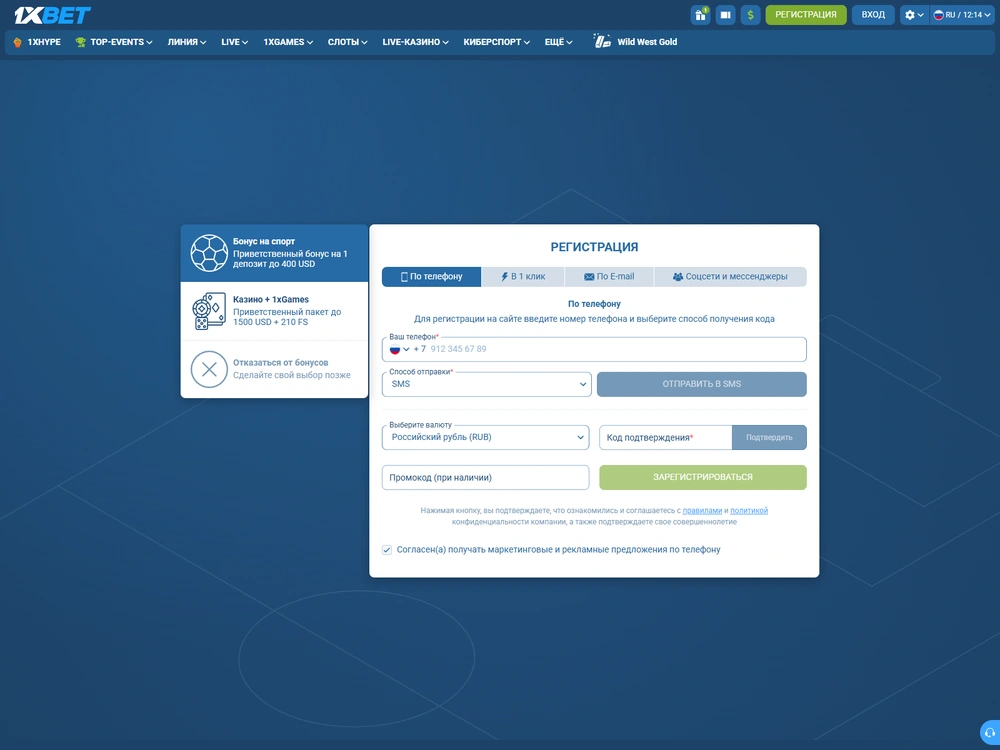
For Stake, 1xBet and Parimatch, “no new documents requested” describes my particular withdrawal. The payment-wallet identity matched the operator account. That existing match is part of the result. It does not establish a permanent exemption from identity checks.
The registration route also had a concrete device context: I used the 1win Android launcher on Xiaomi 15 Ultra, a mobile browser on the same phone for Melbet, Safari on iPhone 15 Pro for Stake and Parimatch, and desktop Chrome on Slimbook EVO 14 for 1xBet and CroreBet.
The practical comparison is between contact channels and later checks, rather than the number of fields visible on a form.
Tower Rush register steps using the 1win form
The 1win form in my Bangladesh test required email, a password, country, currency, phone, and confirmation of age and terms. I entered the phone number during registration. Email confirmation followed account creation. SMS was used later for a sensitive action.
Required fields and what they control
The form separated contact information from account settings and acceptance choices. Email and phone supplied contact channels, Bangladesh identified the account country, and BDT identified its currency. The age and terms confirmations were separate elements; neither was a substitute for a later identity-document request.
| Form element | Entry or action in my test | Purpose in the account journey |
|---|---|---|
| Entered and subsequently confirmed by link | Contact channel and first-login identifier | |
| Password | Created during registration | Credential used with email for the first login |
| Country | Bangladesh | Country recorded for this account |
| Currency | BDT | Currency selected for this account |
| Phone | Entered during registration | Registered number used for later SMS authentication |
| Age and terms | Confirmed as separate form elements | Acceptance required in the registration flow |
| Promo code | Left blank | Optional entry in this registration |
| Marketing messages | Left disabled | Optional subscription choice |
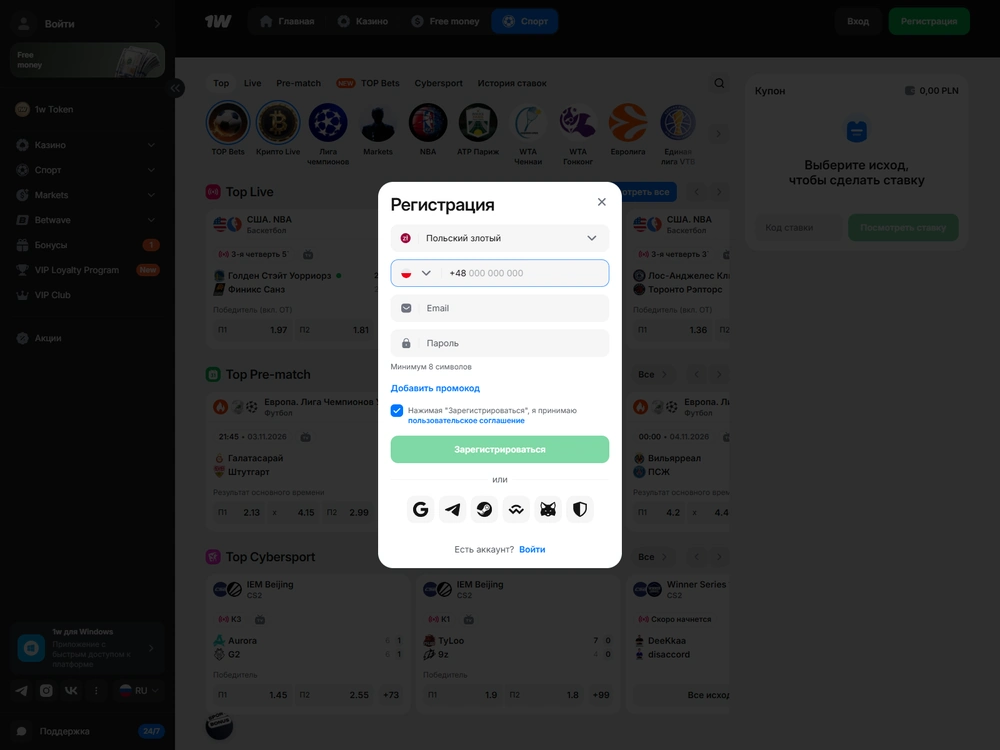
Check country and currency as separate fields. Selecting BDT identifies a currency; it does not by itself establish that the operator accepts an applicant from Bangladesh. Likewise, an English interface is a language setting and does not replace the operator's country restrictions or account terms.
Create the account and confirm email
Tower Rush operator account sign-up begins with the operator's own registration form. The following sequence follows my 1win account journey; use the requirements of the actual form when another operator presents a different route.
- Open the operator's registration form and check that its country conditions allow your application.
- Enter your email address and phone number. Check the entries before submitting so that the confirmation reaches the contact channel you intend to use.
- Create your password and select the correct country and account currency. In my Bangladesh form, these were Bangladesh and BDT.
- Read the age and terms confirmations and complete the required acceptance fields. Check optional entries separately, including any promo-code field or marketing subscription.
- Submit the form, open the email confirmation message and follow its link. I completed this confirmation after creating the account and before starting the money journey.
- Sign in with the registered email and password. Check that you are in the same operator account before opening the game or proceeding to another account task.
The account was created and its email channel confirmed. No identity or address documents were requested at this stage. I then signed in successfully with email and password. Those credentials opened the same operator account, ready for its next task.
Optional entries and consent choices
I left the 1win promo-code field blank and marketing messages disabled, and the registration still completed. Check those optional choices independently of the required age and terms confirmations: the presence of a promotional field does not make it compulsory.
Tower Rush operator reviews
Six completed Bangladesh BDT tests. Scores and payment results reflect the tested accounts.
-

BDT access score7.15/10
- 96.55% configured RTP.
- 891 BDT received via bKash after a 9 BDT deduction.
-

BDT access score7.40/10
- 96.69% configured RTP.
- 1,900 BDT received via Nagad with no deduction after identity and address checks.
-

BDT access score7.15/10
- 96.19% configured RTP.
- 2,084.25 BDT received via Nagad after a 15.75 BDT withdrawal fee.
-

BDT access score7.15/10
- 97.00% configured RTP.
- 1,200 BDT received via bKash in 6 min 27 sec. The deposit had a 30.36 BDT external charge.
-

BDT access score7.40/10
- 96.65% configured RTP.
- 1,500 BDT received via bKash in full. The deposit had no external charge.
-

BDT access score7.40/10
- 96.33% configured RTP.
- 500 BDT received via bKash in full after identity and address checks.
I did not activate a welcome offer in any of the six money tests. Account creation and promotion activation therefore remained separate in these journeys. A completed form is not a finding about bonus eligibility. It does not establish the game’s contribution to a particular offer’s wagering conditions.
What confirmation proves at each stage
Email confirmation, SMS authentication and document verification establish different things at different stages of the account journey. At 1win, the email link came after account creation, payment confirmation occurred in my own wallet, and identity plus address documents were requested before the first withdrawal was approved.
| Stage | Action in my test | Meaning of the completed step |
|---|---|---|
| Registration | Entered email and phone; created the account | The operator account existed |
| Email confirmation | Accepted the email link | The registered email channel was confirmed |
| First login | Used email and password | The credentials opened that account |
| First deposit | Confirmed payment with a PIN in my personal wallet | The payment was authorised through the wallet |
| First withdrawal | Completed SMS authentication and supplied identity and address documents | The withdrawal passed the required account checks before approval |
My payment wallet was already identified before the deposit; creating or verifying a new wallet was outside that registration journey.
The first withdrawal remained pending while its checks were outstanding. I supplied the requested identity and address documents, and both were accepted before approval. The email link had not removed that requirement. Nor did the pending status mean that the withdrawal had already been rejected.
Use the verification and documents guide to distinguish identity, address, wallet ownership and source-of-funds requests before responding to a document task.
Country eligibility and an interrupted sign-up
Betify excludes Bangladesh from registration even though Tower Rush appears in its catalogue. Check operator eligibility before completing a form. Country is an account condition. The availability of a game title or demo does not replace it.
If a confirmation fails, check the entered contact details and the current account state, keeping the task attached to the same registration rather than creating another account.
Use the operator’s account support for an unresolved problem and identify the stage clearly. Did the form fail to submit? Was the email link rejected, or was the problem with SMS? These are different account tasks, and the editor of this site cannot complete them for you.
The licences and legal context page explains the separate roles of game provider, operator and publisher. Successful technical access should not be used as a substitute for that distinction.
Choose the next account task
A completed Tower Rush register process gives you an operator account with its required contact confirmations; use the same credentials for the first login and treat any later KYC request as a separate account task.
Go to login and recovery for an existing account, verification and documents for a document request, or real-money account and balance basics for the next stage of the money journey.
Registration questions
Do I create an account with Tower Rush Bangladesh?
No. This site has no reader accounts and does not accept bets or deposits. Real-money access uses an account at the operator hosting the game. The editorial contact form is for enquiries and corrections.
Must I confirm both email and phone?
It depends on the operator's route. I confirmed email at 1win and SMS at 1xBet; Melbet used both. Entering a phone number and confirming it by SMS are separate actions.
Is a promo code required for the 1win form?
No. I left the promo-code field empty and completed registration. Marketing messages also remained disabled. Those optional choices were separate from the required age and terms confirmations.
Does confirmed email mean my account has passed KYC?
No. In my 1win account, email confirmation preceded the money journey, while identity and address documents were requested at the first withdrawal. Contact-channel confirmation and document verification were separate stages.
Can I use the official demo without registering?
Yes. I opened the official FUN demo without an operator account or deposit. Its virtual balance remained separate from the operator cash account used for real-money play.
Should I register again if I already have an account?
Use the existing account. If you cannot access it, follow the operator's login or recovery route. A failed confirmation or forgotten password should be handled as a problem with that account, rather than by starting another registration.